
Wondering what happens after your Ditch or Date speed dating event?
At the end of the evening, use the QR code on your score sheet to go straight to our login page and enter your choices online. It is quick, puts you in control of your selections and helps us process everyone’s matches as smoothly as possible.
If you cannot enter your choices yourself, simply hand the top white copy of your duplicate score sheet to your host before you leave. If your choices have not been entered online by the deadline, our team can enter them for you so you do not miss a potential match.
How Your Matches Work
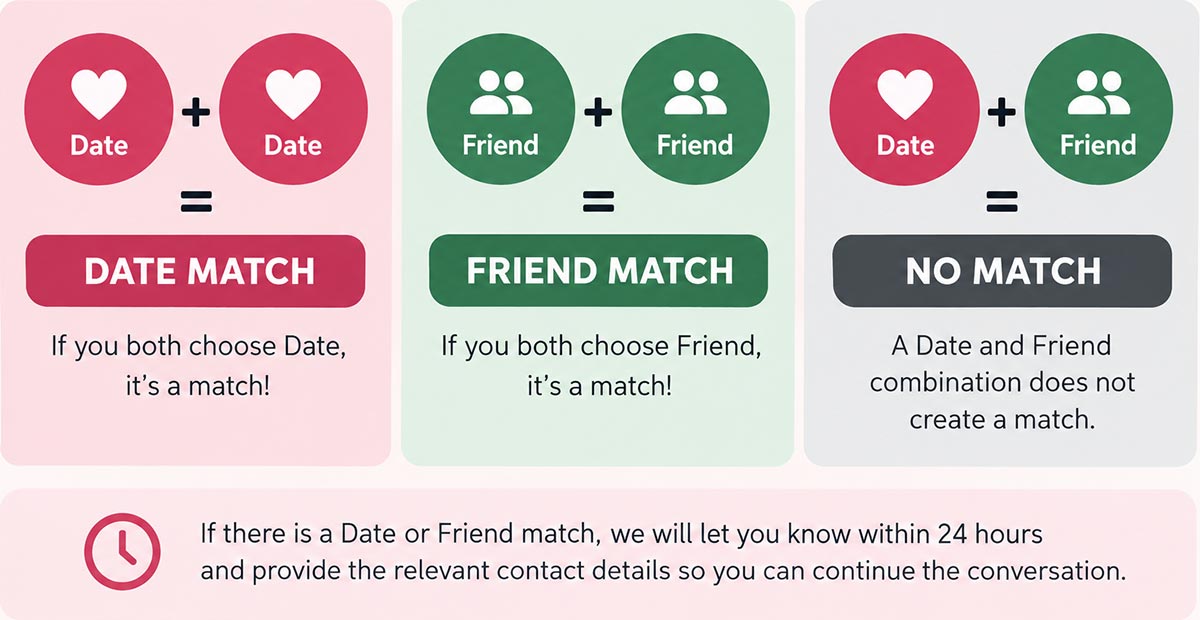
Date + Date = DATE MATCH
Friend + Friend = FRIEND MATCH
Date + Friend = NO MATCH
If there is a Date or Friend match, we will let you know within 24 hours and provide the relevant contact details so you can continue the conversation.
From Score Sheet to Match Notification
We encourage everyone to enter their own choices online after the event. Your score sheet includes a QR code that takes you directly to the login area, making it easy to submit your Date, Friend and Ditch selections while the evening is still fresh in your mind.
Entering your own choices means there is no need for them to be manually re-entered later and helps reduce the chance of transcription mistakes. You can enter your selections straight after the event or any time up to midday the following day.
We also keep a backup. Hand the top white copy of your duplicate score sheet to your host before you leave and, if you are unable to enter your choices online, our team will make sure they are processed for you.
Our matching process is straightforward:
- Choose Date, Friend or Ditch for the people you meet
- Use the QR code on your score sheet to log in and enter your choices online
- Hand the top white copy of your duplicate score sheet to your host as a backup
- Our team enters any remaining choices that have not been submitted online
- Our matching system works out all Date and Friend matches
- Match notifications are sent within 24 hours
- Your match report remains available through your account

What Happens After the Event?
Once the speed dating rounds are finished, there are just a few simple steps between making your choices and finding out who you matched with.
1. Make Your Choices
During the event, use your score sheet to keep track of the people you meet and decide who you would like to see again.
Select Date for someone you would like to meet again romantically, Friend for someone you would like to stay in touch with socially, or Ditch where you do not want a further connection.
2. Enter Your Choices Online
We encourage you to enter your own selections online. Scan the QR code printed on your score sheet to go directly to the login area, or log in online using your email address and password.
You can submit your choices straight after the event and have until midday the following day to complete them.
If you have forgotten your password, or are not sure what it is, select Forgotten Password on the login page and a password will be emailed to the address linked to your booking.
3. Hand In Your Score Sheet as a Backup
Before you leave the event, hand the top white copy of your duplicate score sheet to your host.
We still recommend entering your own choices online, but the handed-in copy gives you a useful safety net. If work, time constraints or anything else prevents you from logging in before the deadline, our team can enter any outstanding choices for you.
This means you will not miss a potential Date or Friend match simply because you did not get time to submit your choices online.
4. Ditch or Date Works Out Everyone’s Matches
Once everyone’s choices have been entered, our matching system works out everyone’s matches automatically using the Date and Friend matching rules above.
Contact details are only shared where there is a corresponding Date or Friend match, so a Date + Friend combination does not create a match.
5. Receive Your Match Results
We will notify you of your matches within 24 hours of the event. Where you have a Date or Friend match, your results will include the relevant contact details so you can decide how and when to continue the conversation.
You can also log back into your account later to view your match report again.


Why Enter Your Choices Online?
Entering your own choices online is the quickest way to make sure your selections are recorded exactly as you intended. It also means your choices do not need to be manually copied from your score sheet afterwards.
You can do it straight after the event using the QR code on your score sheet, or log in online later before midday the following day.
And if you cannot get online in time, handing the white copy of your score sheet to your host means you still have the reassurance that our team can process your choices for you.
What Counts as a Match?
A Date match is created when you both choose Date. A Friend match is created when you both choose Friend. If one person chooses Date and the other chooses Friend, no match is created.
The important part is that the choice corresponds on both sides. Your contact details are only shared as part of a Date or Friend match.
Your Match Report & Contact Details
Your match report is available through your account, giving you a record of the people you matched with after the event.
Contact information is only shared as part of a Date or Friend match. If you need to update the contact details associated with your account, do this before your matches are processed so the correct details are used.
If you have forgotten your password, use the Forgotten Password option on the login page and a password will be sent to the email address linked to your booking.
If you are expecting your match notification and cannot see it, check your junk or spam folder before contacting us.
What Happens Next?
Once you receive a match, there is no complicated system or lengthy online chat to work through. You have already met face-to-face, so the next step is simply deciding whether you would like to carry on the conversation.
You might send a quick message, arrange a coffee or drink, or simply take your time. The contact details give you both the opportunity to decide what happens next.
Not been to an event yet? Read our guide to how speed dating works or browse upcoming speed dating events across the UK.


